Creating a productive workspace at home goes beyond choosing the right desk or chair. Smart lighting for home office productivity is a powerful way to enhance focus, support well-being, and adapt your environment to the demands of your workday. By leveraging intelligent lighting solutions, you can reduce eye strain, improve mood, and even save energy—all while making your office more comfortable and efficient.
Whether you’re working remotely full-time or just need a dedicated spot for occasional tasks, the right lighting setup can make a significant difference. In this guide, we’ll explore how smart bulbs, fixtures, and controls can transform your workspace, what to look for when choosing products, and practical tips for maximizing their benefits.
For those interested in optimizing other areas of the home, you might also find value in exploring smart lighting for bedroom ideas to create a restful oasis that supports both relaxation and productivity.
Why Lighting Matters for Work Performance
Lighting has a direct impact on how we feel and function throughout the day. Poor illumination can cause headaches, fatigue, and decreased concentration, while well-designed lighting supports alertness and comfort. With the rise of remote work, many people are discovering that traditional overhead lights or dim desk lamps aren’t enough for sustained productivity.
Smart lighting systems allow you to tailor brightness, color temperature, and even scheduling to your needs. This flexibility can help you stay energized during meetings, wind down after hours, or simply create a more inviting workspace. By integrating intelligent lighting solutions, you’re not just making your office look better—you’re actively supporting your own performance.
Key Features of Smart Lighting for Home Office Productivity
When considering upgrades for your workspace, look for features that directly support productivity and comfort. Here are some of the most valuable capabilities to prioritize:
- Adjustable color temperature: Switch between cool white for focus and warm tones for relaxation.
- Dimmable brightness: Fine-tune light levels to match the time of day and your specific tasks.
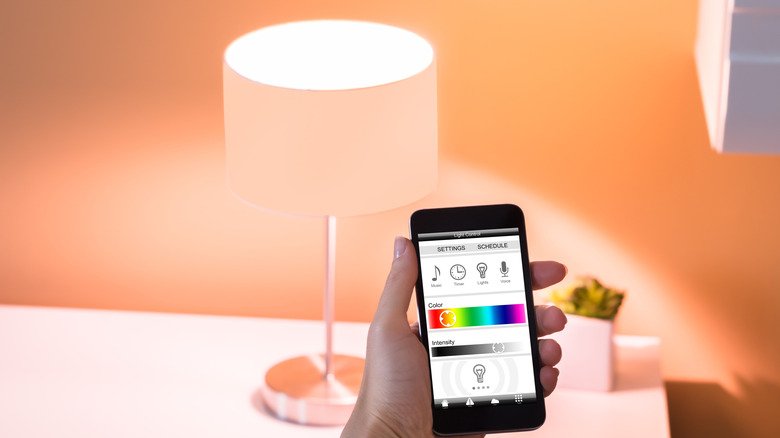
- Voice and app control: Change settings hands-free or from your phone for convenience.
- Scheduling and automation: Set routines that automatically adjust lighting based on your work hours.
- Integration with other smart devices: Sync lighting with calendars, alarms, or even your coffee maker for a seamless start to the day.
For those interested in the environmental side of things, integrating smart lighting environmental impact strategies can help you go green while staying productive.
How to Choose the Best Smart Lighting for Your Workspace
Selecting the right products for your home office involves more than just picking a bulb. Here are a few tips to help you make the best choice:
- Assess your space: Consider the size, layout, and natural light in your office. Larger rooms may need multiple fixtures or brighter bulbs.
- Decide on control methods: Do you prefer using a smartphone app, voice assistant, or physical switch? Make sure your chosen system supports your preferred method.
- Check compatibility: If you already have other smart devices, look for lighting that integrates with your existing ecosystem (like Alexa, Google Assistant, or Apple HomeKit).
- Prioritize energy efficiency: Many smart bulbs are LED-based, which use less power and last longer than traditional options. For more tips, see energy efficient lighting automation tips.
- Read reviews and guides: Consult reputable sources and user feedback to find products that deliver on reliability and features.
For a deeper dive into the benefits of intelligent lighting, check out this comprehensive overview of smart lighting benefits from industry experts.
Practical Tips for Boosting Focus and Comfort
Once you’ve selected your lighting system, a few simple adjustments can help you get the most out of it:
- Set up task lighting: Use a smart desk lamp or directional bulb to illuminate your work area without causing glare on screens.
- Automate your routine: Schedule lights to gradually brighten in the morning and dim in the evening, supporting your natural circadian rhythm.
- Use color temperature wisely: Choose cooler tones (5000–6500K) during periods of intense focus, and switch to warmer tones (2700–3000K) for reading or winding down.
- Reduce distractions: Avoid harsh overhead lights or flickering bulbs, which can cause discomfort and break concentration.
- Experiment with scenes: Many smart systems allow you to save presets for different activities, such as “Meeting Mode,” “Brainstorming,” or “Break Time.”
For living areas, you may also want to explore the smart lighting for living room guide to create a cohesive look and feel throughout your home.
Energy Savings and Sustainability
One of the often-overlooked benefits of upgrading your home office lighting is the potential for lower energy bills and a reduced environmental footprint. Most smart bulbs use LED technology, which consumes a fraction of the energy of traditional incandescent bulbs. With features like scheduling, motion sensors, and remote control, you can ensure lights are only on when needed, further reducing waste.
If you’re comparing traditional and modern lighting solutions, the smart lighting power usage comparison provides a detailed look at how much you can save over time.
Common Challenges and Solutions
While the benefits of smart lighting are clear, some users encounter hurdles during setup or daily use. Here are a few common issues and how to address them:
- Connectivity problems: Ensure your Wi-Fi network is stable and that your smart bulbs are within range. Some systems also support Bluetooth or Zigbee for added reliability.
- Compatibility concerns: Double-check that your chosen bulbs and fixtures work with your preferred voice assistant or smart home hub.
- Glare and reflections: Position lights to avoid shining directly onto screens or glossy surfaces. Use diffusers or indirect lighting when possible.
- Overly complex controls: Start with basic automations and add complexity as you become more comfortable with the system.
By addressing these challenges early, you can enjoy a seamless and productive work environment.
FAQ
How does smart lighting improve productivity in a home office?
Smart lighting allows you to customize brightness and color temperature, supporting alertness and reducing eye strain. Automated schedules and scene settings help maintain focus and create a comfortable environment tailored to your work routine.
Can smart lighting help reduce energy costs?
Yes, most smart bulbs use energy-efficient LED technology and offer features like scheduling and remote control. This ensures lights are only on when needed, which can significantly lower your electricity bills over time.
What should I look for when choosing smart lighting for my workspace?
Prioritize features like adjustable color temperature, dimmable brightness, compatibility with your smart home system, and ease of control. Reading reviews and considering your specific space and workflow will help you find the best fit.
Are there health benefits to using smart lighting?
Proper lighting can reduce headaches, eye strain, and fatigue. By mimicking natural daylight and supporting your circadian rhythm, smart lighting can also improve mood and overall well-being during long work hours.
How do I integrate smart lighting with other devices?
Many smart lighting systems work with popular voice assistants and smart home platforms. Look for products compatible with Alexa, Google Assistant, or Apple HomeKit, and use their apps or routines to coordinate lighting with other devices.