Modernizing your home with smart lighting is one of the most effective ways to enhance comfort, efficiency, and convenience without a major renovation. Whether you want to control lights with your voice, automate schedules, or improve energy savings, a retrofit approach lets you bring intelligent lighting into any existing space. This smart lighting retrofit guide will walk you through the essential steps, product options, and best practices for transforming your current setup into a connected, future-ready environment.
Before diving into the technical details, it’s helpful to understand the key benefits of upgrading your lighting system. Smart bulbs and switches offer features like remote control, dimming, color tuning, and integration with other smart devices. These capabilities not only improve daily living but can also boost your home’s value and sustainability. If you’re interested in exploring design-focused ideas, check out smart lighting for modern interiors for inspiration on blending technology with style.
Why Retrofit Your Lighting With Smart Technology?
Retrofitting allows you to upgrade your lighting system without rewiring or extensive construction. Instead of starting from scratch, you simply replace existing bulbs, switches, or fixtures with smart alternatives. This approach is ideal for homeowners and renters alike, as it minimizes disruption and keeps costs manageable.
Some of the main advantages include:
- Energy savings through automation and efficient LED technology
- Enhanced convenience with app, voice, or sensor-based control
- Improved security via scheduled lighting and remote access
- Personalized ambiance with adjustable brightness and color
- Easy integration with other smart home devices
For a deeper dive into the advantages, see this overview of smart lighting benefits.
Choosing the Right Smart Lighting Retrofit Solution
There are several paths to upgrading your current lighting. The best choice depends on your goals, budget, and technical comfort. Here are the most common retrofit options:
Smart Bulbs
Smart bulbs are the simplest way to get started. They screw into standard sockets and connect to your Wi-Fi or a dedicated hub. Popular brands like Philips Hue and Kasa offer a wide range of options, including white, tunable white, and full-color bulbs. You can control them via smartphone apps, voice assistants, or automation routines.

Smart Switches and Dimmers
If you want to keep your existing light fixtures or use regular bulbs, smart switches are a great alternative. These replace your wall switches and allow you to control multiple lights at once. Installation is more involved than swapping bulbs, but it provides a more seamless look and works even if someone turns off the switch manually.
Look for models compatible with your wiring (neutral wire required in most cases) and preferred smart home platform (such as Alexa, Google Home, or Apple HomeKit).
Smart Plugs and Adapters
For lamps or plug-in fixtures, smart plugs offer an easy retrofit solution. Simply plug your lamp into the smart plug, connect it to your network, and gain remote control and scheduling features. This is especially useful for renters or anyone seeking a non-permanent upgrade.
Planning Your Smart Lighting Upgrade
Before purchasing devices, take time to plan your retrofit. Consider the following steps:
- Assess your current lighting: Identify which fixtures, rooms, or zones you want to automate.
- Choose your control method: Decide if you prefer app-based, voice, or physical controls.
- Check compatibility: Ensure your chosen products work with your existing smart home system or preferred ecosystem.
- Start small: Begin with a few key areas (like the living room or entryway) before expanding throughout your home.
- Plan for future expansion: Select products that can scale as your needs grow.
For those living in older properties, you may want to review smart lighting for old houses explained for tips on overcoming common retrofit challenges in vintage homes.
Installation Tips for a Smooth Retrofit
Upgrading to smart lighting is usually straightforward, but a few best practices will help ensure success:
- Always turn off power at the breaker before replacing switches or fixtures.
- Follow manufacturer instructions carefully for pairing devices with your network or hub.
- Label your circuits and devices for easy troubleshooting later.
- Test each device after installation to confirm proper operation.
- Update firmware and apps regularly for security and new features.
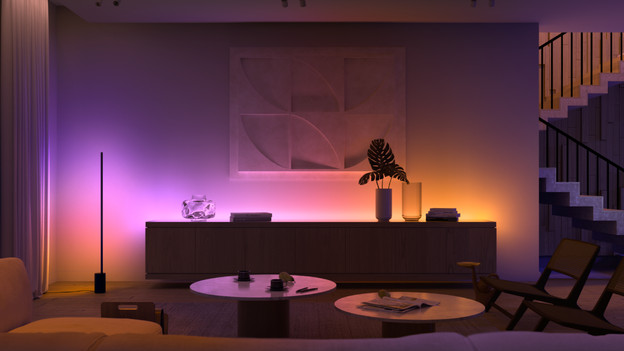
Integrating Smart Lighting With Your Home Ecosystem
One of the biggest advantages of connected lighting is the ability to integrate with other smart devices. Here are some ways to maximize your upgrade:
- Set up automation routines, such as turning lights on at sunset or when you arrive home.
- Link lighting with motion sensors for hands-free operation in hallways or bathrooms.
- Coordinate lighting scenes with music, entertainment, or security systems.
- Use voice assistants like Alexa, Google Assistant, or Siri for hands-free control.
- Monitor energy usage and adjust schedules to optimize savings.
If you’re planning a more extensive renovation or building a new property, see the smart lighting for new homes guide for tips on integrating technology from the ground up.
Common Challenges and How to Overcome Them
While most retrofits are straightforward, you may encounter a few hurdles:
- Wi-Fi dead zones: Use mesh networks or range extenders to ensure reliable connectivity for all devices.
- Switch compatibility: Some homes lack a neutral wire, which is required for many smart switches. In these cases, look for no-neutral models or opt for smart bulbs instead.
- Device overload: Too many Wi-Fi devices can slow your network. Consider Zigbee, Z-Wave, or Thread-based products for larger setups.
- Family acceptance: Make sure everyone in the household understands how to use the new controls, and keep some manual options available for guests.
Expanding Your Smart Lighting System
Once you’ve mastered the basics, you can expand your system with advanced features:
- Install smart dimmers for fine-tuned ambiance in living and dining areas.
- Add outdoor smart lighting for security and curb appeal.
- Explore color-changing bulbs for entertainment spaces or mood lighting.
- Integrate with other smart home devices, such as thermostats, locks, or cameras, for a unified experience.
Stay up to date with the latest smart lighting design trends to keep your home both stylish and functional.
Frequently Asked Questions
Can I retrofit smart lighting in a rental property?
Yes, smart bulbs and plugs are ideal for renters because they don’t require permanent changes. Simply swap out bulbs or use smart plugs for lamps, and take them with you when you move.
Do I need a hub for my smart lighting system?
Some products, like Philips Hue, work best with a dedicated hub, while others (such as many Wi-Fi bulbs) connect directly to your network. Check the requirements for your chosen devices before purchasing.
Will smart lighting increase my electricity bill?
Most smart lighting products use energy-efficient LEDs and offer scheduling features that can actually reduce your energy usage. Automation ensures lights are only on when needed, helping to lower costs over time.
Is it difficult to install smart switches?
Installing smart switches is a bit more involved than changing bulbs, but it’s manageable for most DIYers. Always turn off power at the breaker and follow the manufacturer’s instructions. If you’re unsure, consult a licensed electrician.
Can I mix and match different brands?
Many smart lighting products are compatible with major platforms like Alexa, Google Home, or Apple HomeKit. However, for the smoothest experience, try to stick to one ecosystem or check compatibility before purchasing.
Upgrading your lighting with smart technology is a practical way to bring convenience, efficiency, and style to your home. With careful planning and the right products, you can enjoy the benefits of intelligent lighting in any space.