Creating a smart lighting ecosystem is one of the most effective ways to enhance your living space with convenience, energy efficiency, and modern automation. Whether you’re upgrading a single room or transforming your entire house, understanding how to build a connected lighting setup can save you time, money, and hassle. This smart lighting ecosystem guide will walk you through the essentials, from choosing the right products to integrating them seamlessly with your home’s other smart devices.
Before diving into the details, it’s worth noting that smart lighting goes beyond simple remote control. It enables automation, voice commands, and integration with routines that can improve comfort and security. If you’re interested in learning how these systems can also help reduce your environmental impact, check out how smart lighting saves energy for a deeper look at sustainability benefits.
Understanding the Smart Lighting Ecosystem
At its core, a connected lighting system consists of smart bulbs, switches, hubs, and controls that communicate via Wi-Fi, Zigbee, Z-Wave, Bluetooth, or proprietary protocols. These devices can be managed through mobile apps, voice assistants, or automation routines. The goal is to create a cohesive network where all lighting elements work together for maximum flexibility and control.
Key components include:
- Smart bulbs: Replace traditional bulbs and offer features like dimming, color changes, and scheduling.
- Smart switches and dimmers: Allow manual and automated control of standard fixtures.
- Hubs and bridges: Centralize device management and enable integration with other smart home systems.
- Sensors: Detect motion, ambient light, or occupancy to trigger lighting changes automatically.
When planning your setup, consider compatibility with platforms such as Amazon Alexa, Google Assistant, or Apple HomeKit. This ensures your lighting can be controlled alongside other smart devices for a truly unified experience.
Benefits of a Connected Lighting Setup
Investing in a smart lighting ecosystem brings several advantages:
- Energy efficiency: Automate lights to turn off when not needed, reducing electricity usage. For more tips, see our energy efficiency smart lighting guide.
- Convenience: Control lights remotely or with your voice, set schedules, and create scenes for different moods or activities.
- Security: Use lighting automation to simulate occupancy when you’re away, deterring potential intruders.
- Customization: Adjust brightness and color to suit your preferences or activities, from movie nights to focused work sessions.
According to seven key reasons for smart lighting adoption, these systems can also improve well-being, productivity, and even property value.
Choosing the Right Products for Your Home
Not all smart lighting products are created equal. When selecting devices, consider:
- Compatibility: Ensure bulbs, switches, and hubs work with your chosen ecosystem (e.g., Alexa, Google, Apple).
- Connectivity: Decide if you prefer Wi-Fi (easy setup, but can crowd your network) or Zigbee/Z-Wave (requires a hub but offers reliability and scalability).
- Features: Look for dimming, color temperature adjustment, RGB color options, and integration with sensors or routines.
- Expandability: Choose brands that allow you to add more devices over time as your needs grow.
Popular starter kits like Philips Hue and Kasa Smart offer a balance of reliability, app support, and integration with major platforms. For more advanced control, consider adding motion sensors or smart switches to automate lighting based on activity and time of day.
Setting Up Your Smart Lighting Network
Once you’ve selected your devices, follow these steps to build your connected lighting system:
- Install smart bulbs or switches in desired fixtures. Most products are designed for easy DIY installation.
- Connect bulbs and switches to your home network using the manufacturer’s app. If using Zigbee or Z-Wave, set up the hub or bridge first.
- Group lights by room or zone in the app for easier management and scene creation.
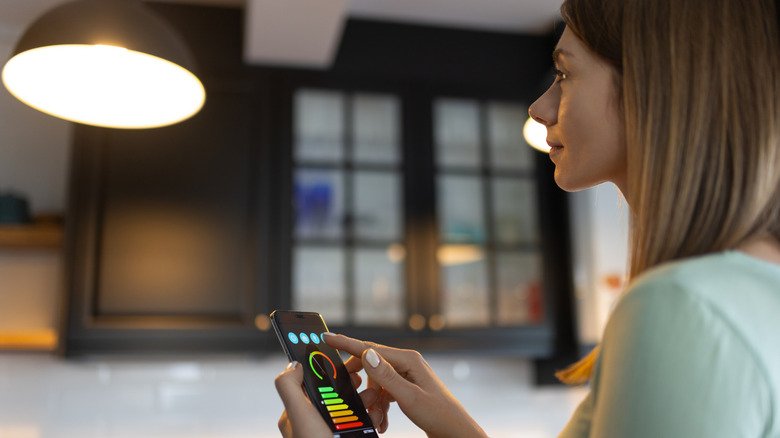
- Integrate with voice assistants like Alexa, Google Assistant, or Siri for hands-free control. For tips, see our smart lighting voice control guide.
- Create routines and automations to schedule lights, trigger them based on motion, or sync with other smart devices.
Take advantage of app features to fine-tune your setup. For a deeper dive into app capabilities, explore smart lighting app features explained.

Automation Ideas for Your Lighting Ecosystem
With your network in place, explore creative ways to automate your lighting:
- Wake-up routines: Gradually brighten bedroom lights in the morning to mimic sunrise.
- Night mode: Dim or turn off lights automatically at bedtime.
- Motion-activated lighting: Use sensors in hallways or bathrooms for hands-free illumination at night.
- Vacation mode: Randomize lighting schedules to simulate occupancy when you’re away.
- Scene setting: Create presets for movie nights, dinner parties, or focused work sessions.
For more inspiration, see our collection of smart lighting automation ideas to simplify your daily routines.
Common Challenges and Troubleshooting Tips
While setting up a smart lighting ecosystem is generally straightforward, you may encounter some hurdles:
- Connectivity issues: Ensure your Wi-Fi network is strong and consider using mesh routers for larger homes.
- Device compatibility: Double-check that all products support your chosen platform and protocols.
- Firmware updates: Keep devices updated to access the latest features and security patches.
- App confusion: If using multiple brands, try to consolidate control through a central hub or platform like SmartThings or Apple HomeKit.
Most issues can be resolved by resetting devices, updating firmware, or consulting manufacturer support resources.
Frequently Asked Questions
What is the best way to start building a smart lighting system?
Begin with a starter kit from a reputable brand that matches your preferred ecosystem (such as Philips Hue for versatility or Kasa for affordability). Install the bulbs or switches, connect them to your network, and experiment with basic automations before expanding to more rooms or advanced features.
Can I mix and match smart lighting brands?
Yes, but compatibility is key. Many platforms like Alexa, Google Assistant, and Apple HomeKit support multiple brands. However, for the smoothest experience, stick to one ecosystem or ensure all devices are compatible with your chosen hub or app.
Will smart lighting increase my energy bills?
Smart bulbs are typically LED-based and use less energy than traditional bulbs. Automation features help reduce waste by turning lights off when not needed. For more details, see our guide on energy savings with smart lighting.
How secure are smart lighting systems?
Most reputable brands use encryption and regular updates to protect your data. Always use strong passwords, enable two-factor authentication if available, and keep firmware up to date to minimize risks.
Conclusion
Building a connected lighting setup is a practical step toward a smarter, more efficient home. By choosing the right products, integrating them thoughtfully, and exploring automation, you can enjoy greater convenience, security, and energy savings. Use this smart lighting ecosystem guide as your foundation, and don’t hesitate to explore additional resources as you expand your system. With the right approach, your home can be brighter, smarter, and more responsive to your needs.